Vulcan Reference Manual

  • Welcome to Vulcan
  • Features
  • Production Workflow
    • Preparation
    • Jogging and Homing
    • Create
    • File Management
    • Select Program
    • Edit NC Code
    • Edit Laser Technology
    • Edit layout
    • Simulation run
    • Work offsets
    • Run
    • Re-entry
  • Laser Technology Tables (LTT)
    • Terminology
    • Laser Data items
      • Piercing
      • Multistage Piercing
      • Cutting
      • Special Processes
    • Modifying Laser Data
    • LTT Management
    • Ramp Cycles
    • FlyCut
    • Acceleration while cutting (DCA)
  • Technology functions
    • Vaporize Sheet
    • Nanojoints
    • PierceLine Sensor
    • Frog Jumping
    • Analog Gas Calibration
    • Cutting Tools
    • Dynamic Focus Control (DFC)
  • Control Elements
    • Lubrication Cycle
    • Protective Glass Monitoring
    • Scrap Cut
    • Go To Sheet Origin
    • Height Sensor Calibration
    • Nozzle Centre
    • Target Shot
    • Gas Purge
    • HC Manual Set Point
    • Go To Park Position
    • Nozzle Clean & Height Sensor Calibration
    • Edge Detection
    • Focus Comb
    • Focal Distance
    • Pilot Diode Positioning
  • Production plan
    • Create a production plan
    • Modification
    • Run a production plan
    • Running sequence
    • sheet loading
    • Material stock
  • Advanced functionality
    • Nozzle Changer
    • Pallet changer settings
    • Status light
    • Suction cup layout
    • Automation Interface
    • KL59, Laser & Optics
    • Automated corner optimization
  • Programming manual
    • DIN Programming
    • LST Programming
  • Machine configuration
    • Laser database
    • Work offsets
    • Machine settings
  • Experimental features
    • Camera based Nozzle Centering
    • Automated Focus Comb
    • Camera based part placement
    • High Power Options
    • Direct connection to Praxis
  • Service settings
    • General settings
      • Log files
      • Backup settings
    • Calibration of the pilot laser
    • Service settings
    • PLC functions for service's maintenance/ repair work for KL59
    • DCA settings
    • Info messages
  • Troubleshooting
    • Installation
    • Work offset
    • Error data, backup, restore
    • Frequent collisions
    • Laser issues
    • extreme small contours
Experimental features
/
Camera based part placement

Camera based part placement

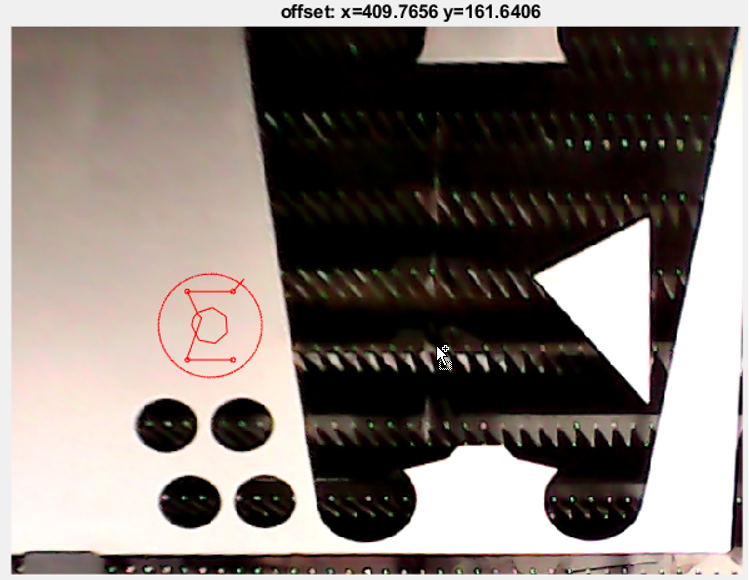
With the general USB camera support a cost efficient solution of a visual placement of parts is possible. It will be realized with an overlay of 2 cameras to cover 600x1500 mm workspace.
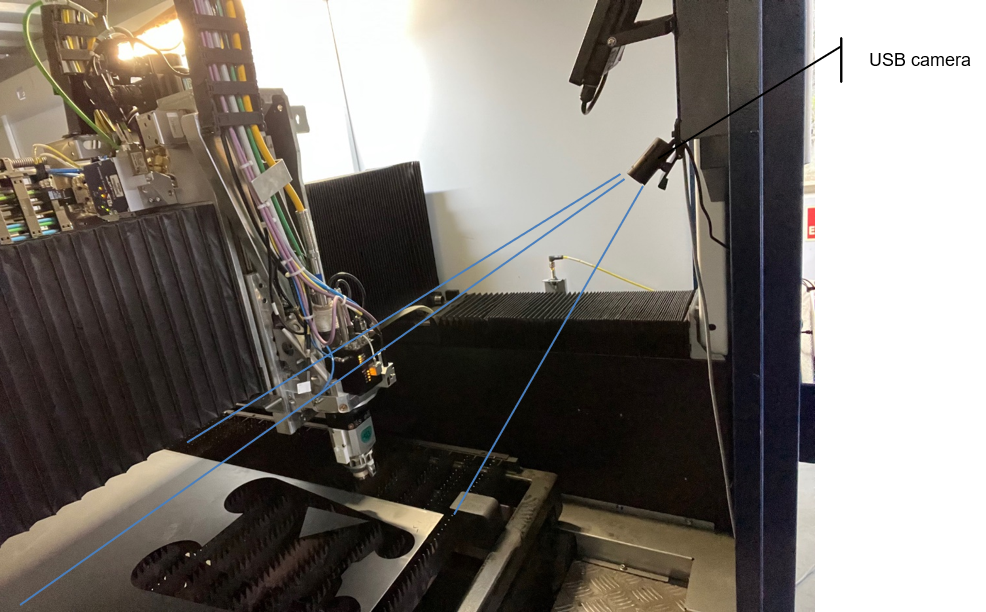
visplace1

visplace2

Automated Focus Comb High Power Options

      Copyright © 2024 by Trumpf-Metamation. All rights reserved.

    Compiled by Bento