
Vulcan Reference Manual

  • Welcome to Vulcan Control
  • Introduction
    • User interface
    • Workflow
    • Machine Operation
    • Control panel
  • Production Workflow
    • Preparation
    • Create
    • File Management
    • Select Program
    • Edit NC Code
    • Edit Laser Technology
    • Edit layout
    • Simulation run
    • Work offsets
    • Run
    • Re-entry
  • Laser Technology Tables (LTT)
    • Terminology
    • Laser Data items
      • Piercing
      • Multistage Piercing
      • Cutting
      • Special Processes
    • Modifying Laser Data
    • LTT Management
    • Ramp Cycles
    • FlyLine
    • Acceleration control (DCA)
  • Technology functions
    • Vaporize Sheet
    • Nanojoints
    • PierceLine Sensor
    • Frog Jumping
    • Cutting Tools
  • Controls
    • Lubrication Cycle
    • Protective Glass Monitoring
    • Scrap Cut
    • Go To Sheet Origin
    • Height Sensor Calibration
    • Nozzle Centre
    • Target Shot
    • Gas Purge
    • HC Manual Set Point
    • Go To Park Position
    • Nozzle Clean & Height Sensor Calibration
    • Edge Detection
    • Focus Comb
    • Focal Distance
    • Pilot Diode Positioning
  • Production plan
    • Create a production plan
    • Modification
    • Run a production plan
    • Running sequence
    • sheet loading
    • Material stock
  • Drop and Cut
  • Troubleshooting
    • Frequent collisions
    • Work offset
    • Extreme small contours
  • NC Programming Reference
    • DIN format
      • DIN Program Structure
        • Program Number %
        • Block number N
        • G-functions
        • M-functions
        • Parameter Array
        • Graphical Element – Display Marker Lines
      • Laser Technology
        • Program Header
        • Technology Table (TT) Transfer
        • Check for Bound Program Active
        • Block Jump
        • Block Number
        • Start of a Part information
        • Laser parameters selection & Update
        • Contour Statements
        • Program End (G99)
        • Remnant Cut
          • Start Remnant Cut
          • End Remnant Cut
        • FlyLine
        • Only Piercing in the Contour
        • Nano Joints
        • Sample Program with Multiple Parts
        • Fly Cut Sample Program:
    • LST format
      • LST Program Structure
      • FlyLine
      • TC_WRITE
      • Incremental Command (IC)
      • Soft Micro-Joints & Nano-Joints
    • Laser Technology commands
      • Laser cutting
      • Identifying parts
      • Multiple program structure
      • Cutting distance
      • Kerf correction
      • Overshoot height
      • Timing of parts
      • Bevel cut
      • Beam suppression
      • Flying focus position alteration
  • Impressum
Production Workflow
/
Preparation

Preparation

Switching the machine ON

Unlocking the EMERGENCY STOP pushbutton

EMERGENCY STOP push buttons are located on the operating panel of the laser processing machine and on the safety post of the pallet changer.

To release the EMERGENCY STOP push-button, press it in and turn it in clockwise direction.

Close the door

The machine could only be started when the door switch is locked in. If the door button is not turning into steady illumination please check the alignment of the door switch.

Switch ON the drives

Use the drive enable key.

Homing the Axis

When the machine is switched ON, the axes must be homed. This is done by pressing the HOME → Automatic key in the HMI interface. The axes are then moved to the reference point.

Switch on the laser

Use the laser key to switch ON the laser.

Calibrating the height control, Nozzle centering

It is important that the height control gets calibrated after startup and any time you modify the machine setup. A precise calibrated machine produces higher cut quality and reduces collisions which will enhance the lifetime of your components.

Please refer to the respective sections in the Operation Manual.

  • Height Sensor Calibration.

  • Nozzle Centering.

Clear the error messages

Whenever there is a communication from PLC, the user can view the messages displayed in bottom left corner.
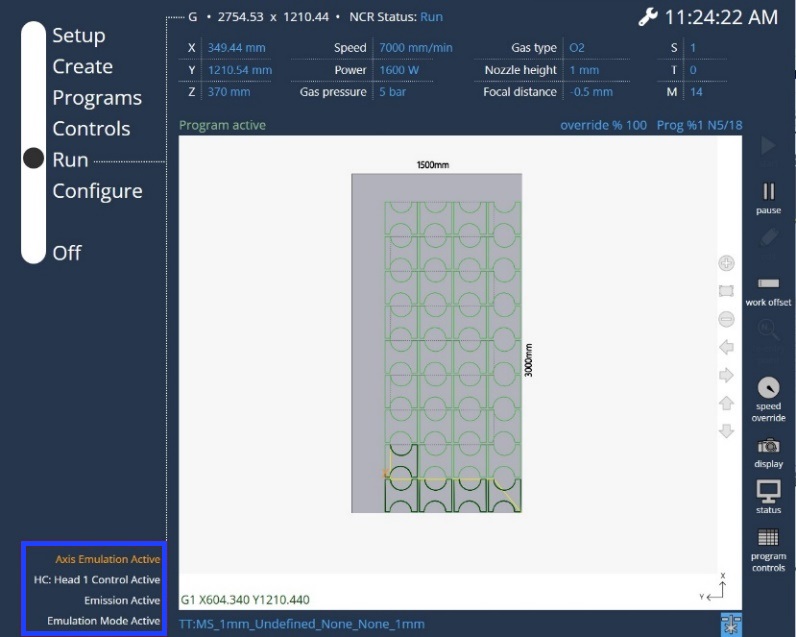
PLC static messages

Switching the machine OFF

Please shut down the HMI before you switch OFF the system power supply to prevent a possible data loss.

Contents

  • Switching the machine ON
  • Unlocking the EMERGENCY STOP pushbutton
  • Close the door
  • Switch ON the drives
  • Homing the Axis
  • Switch on the laser
  • Calibrating the height control, Nozzle centering
  • Clear the error messages
Production Workflow Create

      Copyright © 2025 TRUMPF Metamation. All rights reserved.

    Compiled by Bento